Full list of system requirements:
Native Plugins
Mac:
Apple Mac 2015 or newer, with Intel or Apple Silicon processor
Minimum: Mac OS X 10.14 Mojave (Recommended 11 Big Sur or higher)
Memory (RAM): 8 GB minimum (16 GB or more recommended)
Windows:
• Windows 10/11 (64-bit) with latest Microsoft Updates
• Memory (RAM): 8 GB minimum (16 GB or more recommended)
• CPU: Minimum Intel Core i3™ or AMD Ryzen 1000 (Higher recommended)
Additional:
Stable internet connection is required to download and authorise the plugins.
A free iLok account is required, with iLok Cloud or iLok USB (2nd gen or higher)
*A physical iLok dongle is NOT required to activate this product
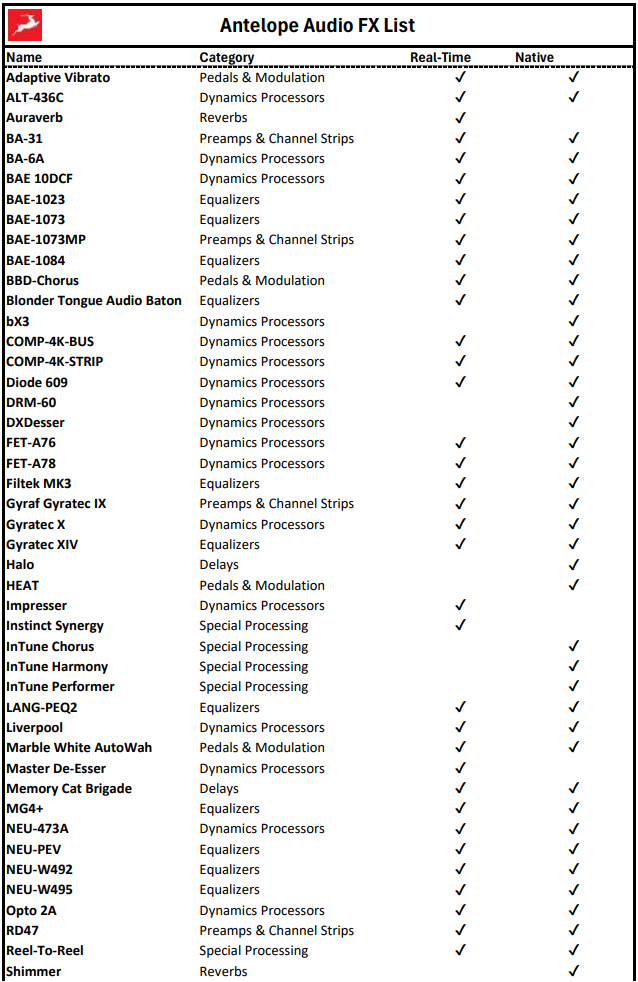
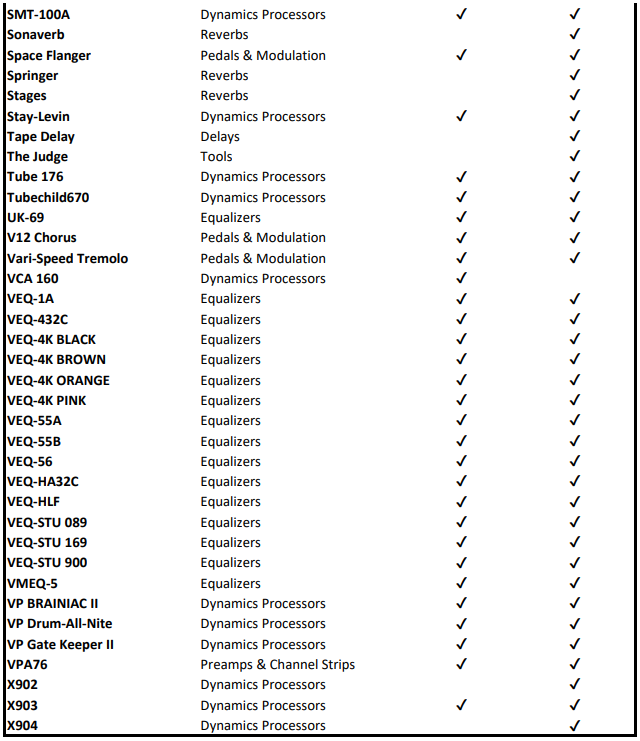
Synergy Core Real-Time
Real-Time FX require a compatible Synergy Core device to run.
Full list of compatible devices:
Zen Quadro Synergy Core
Zen Go Synergy Core (USB and Thunderbolt)
Zen Q Synergy Core (USB and Thunderbolt)
Zen Tour Synergy Core
Discrete 4 Synergy Core
Discrete 4 Pro Synergy Core
Discrete 8 Synergy Core
Discrete 8 Pro Synergy Core
Discrete 8 Oryx Synergy Core
Orion Studio Synergy Core
Galaxy 32 Synergy Core
Galaxy 64 Synergy Core
Axino Synergy Core
Edge Go Synergy Core
The plug-ins have been confirmed to operate normally with the following Digital Audio Workstations (DAWs):
Avid Pro Tools
Ableton Live
Image-Line FL Studio
PreSonus Studio One
Steinberg Cubase
Bitwig Studio
Cockos Reaper